


Article By Ashley Montroy, FrontRunner Professional
 Keywords are a must for any website but it definitely takes time and energy to figure out what keywords will work best for your website in your community. In our last blog post, we talked about 4 Steps to Knowing What Your Community Types into Google. Once you determine your list of keywords, you then have to use them effectively so they have an actual impact. Pasting them in willy-nilly defeats the purpose; you need a strategy that targets specific keywords to specific pages that incorporate specific content related to the keywords.
Where to place keywords
Armed with a list of the most suitable keywords that your community is using to find the services you offer, now is the time to apply the keywords to your website. How? Login to your website. If you’re not with FrontRunner and can’t access the administration of your website, perhaps you should consider switching to a company that allows you to easily optimize your site. This is the only way to be able to incorporate your customized keywords into the following areas:
- Page title
- Search descriptions
- On-page content headings
- Image file names & tags
- Browser titles
- On-page links and content area
- Blog
- Social media channels
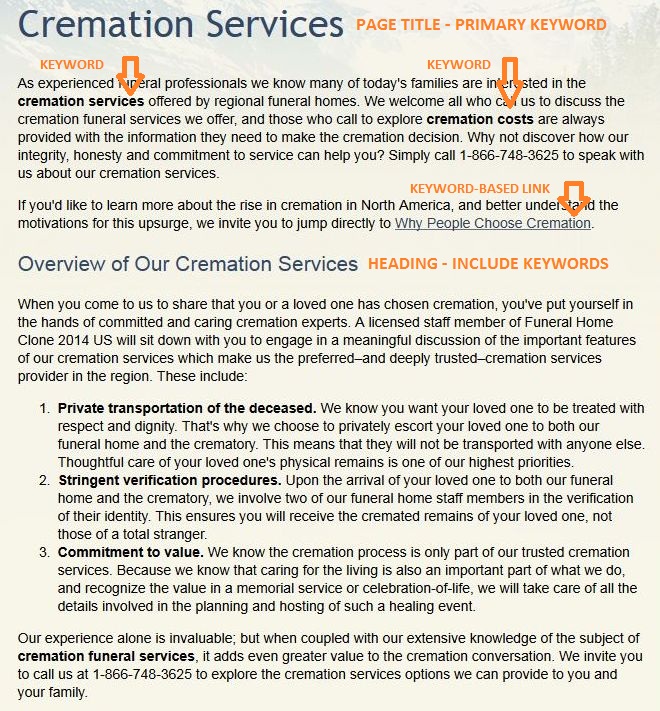
Looking at the graphic below, you will see how keywords related to cremation options have been incorporated in the page title, headings, and within the text. The page title should contain the primary keyword. Further, in the content area of the page, create keyword-based links that not only emphasize the words and phrases that you need to include, but they take your online visitor to the page that details the information they need.
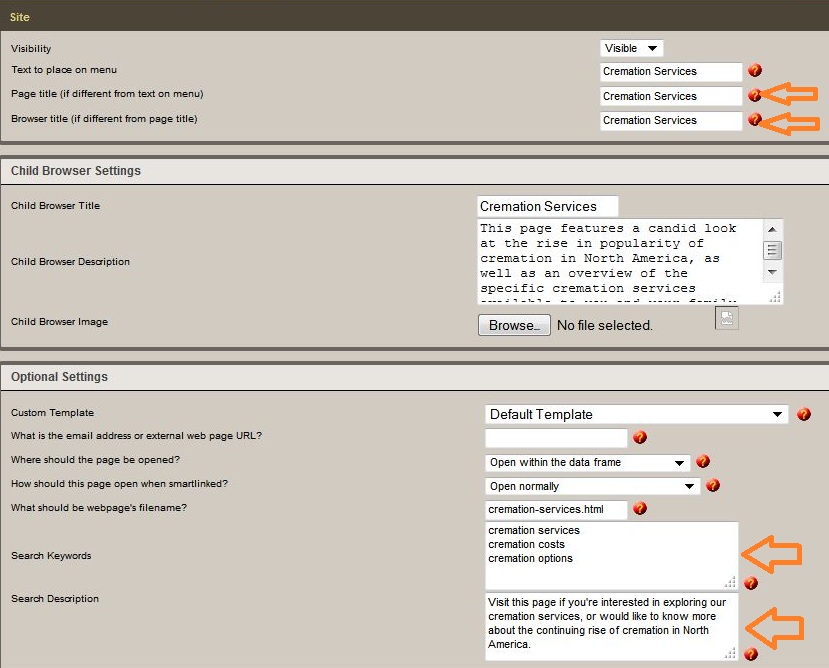
Next – find the page settings to modify your page title (heading), browser title, and search descriptions, using the corresponding keywords. If you’re a FrontRunner client, go to the page and click on ‘Edit Details’ at top right of your screen. You can also add keywords in the ‘Search Keywords’ section but keep in mind that Google has devalued this component but it still holds some value in other search engines.
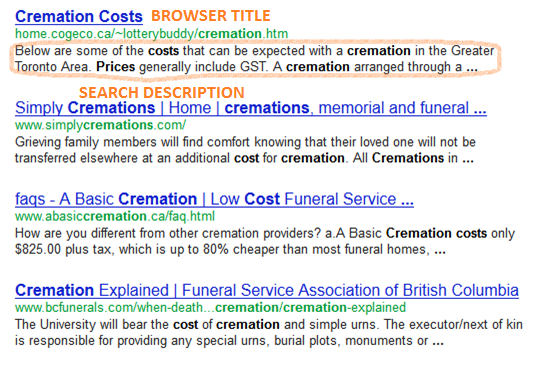
Once the changes are published, the modifications will be visible in the search engine results as seen below:
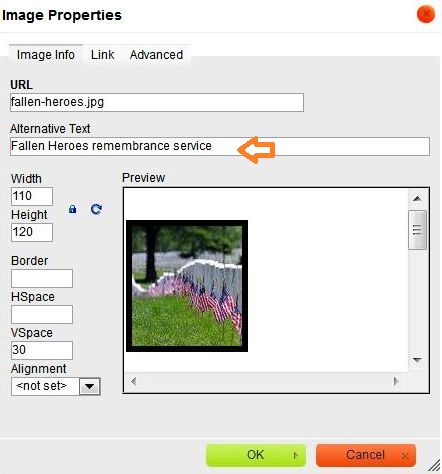
When you add images, make sure the images are descriptively named to include keywords: ex. ‘burial-options’ is much more effective than ‘photo1.’ It’s also important to add a description in the Alternate Text or Alt Text of the image using more keywords. In the FrontRunner system, right click on an image and select ‘Image Properties.’
The final piece of the keyword puzzle is using your keywords whenever you post to your social media channels, your blog, and online directories. When keywords are effectively used – the information related to the keyword is contained within the actual page – online visitors will successfully find your site and the information they need.
A few additional pointers:
- Don’t copy and paste your full list of keywords into every page of your website. The search engines hate that. It’s far better to use the keywords that match the content for specific pages.
- Don’t try to cram every keyword into the content of every page. The wording will become so confusing to readers who will be overwhelmed with information.
- Keep track of your keyword placements and check back regularly (weekly or monthly). Make adjustments when and where necessary.
- Search for your firm and your competitors whenever you can. What do you see? If there’s another type of product or service that is generating interest in the online world, make sure that keyword (and content) is added to your website.
The entire process of optimization – keyword selection and implementation – can take a chunk of time but will serve your firm and website very well. It will allow online visitors to find your website, which when optimized, will direct them to the pages that contain the information about your services and products they need in order to make an informed decision.
If you’ve read all this and feel that you need some guidance or don’t have the time to work through what needs to be done, don’t hesitate to contact FrontRunner SEO team leader, Josh Shannon at 866-748-3625 ext. 503 or by email atjshannon@frontrunner360.com.